Targeting Recipes
Practical examples of Style + Preset combinations for common game scenarios
Targeting Recipes
Practical examples of Style + Preset combinations for common game scenarios.
Note: Blueprint setups shown here are example implementations. Adapt them to fit your game's architecture - your input system, replication needs, and combat flow will differ.
SoulsStyle + MeleeCombat
Use Case: Dark Souls / Elden Ring style melee combat
Configuration
Style: Agentic.Targeting.Style.Souls
Hard Lock (SoftLockUpdatePolicy: None)
Single Target
ValidationPolicy: PoolOnly @ 1.0s
ValidationFailAction: TrySwitch
GracePeriod: 0.5s
RelockAction: TryDifferent
RelockFallback: Release
Preset: Agentic.Targeting.Preset.Melee
Discovery: 15m AOE Sphere
Filters: Targetable + LOS
Scoring: Distance 50% + ScreenCenter 30% + Threat 20%
Flow Diagram
Scoring Example
Player position with 15m sphere overlap. Found after filters: Enemy A, Enemy C.
| Target | Distance (50%) | ScreenCenter (30%) | Threat (20%) | TOTAL |
|---|---|---|---|---|
| Enemy A | 0.8 | 0.6 | 0.3 | 1.70 |
| Enemy C | 0.4 | 0.9 | 0.5 | 1.80 ★ |
Winner: Enemy C (player looking at it despite being farther)
Player Actions
| Action | Result |
|---|---|
| Press Lock (no target) | Find + lock best target |
| Press Lock (has target) | TryDifferent → try next, else Release |
| Target dies | Auto TrySwitch to next (ValidationFailAction) |
| Target behind wall >0.5s | Auto TrySwitch (GracePeriod exceeded) |
| Move away from target | Lock maintained until validation fails |
Blueprint Setup
Simple toggle - press lock button to Lock():
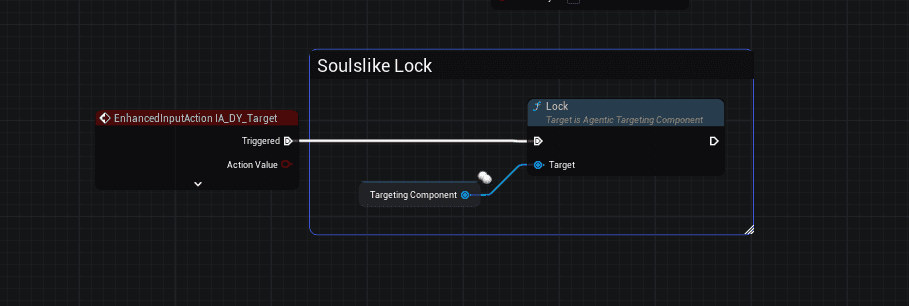
Flow:
EnhancedInputAction(Target/Lock button) fires on Triggered- Call Lock() on AgenticTargetingComponent
- Component handles toggle logic (lock if none, switch/release if has target)
Works for both Melee and Ranged presets - same input, just different preset loaded.
FreeflowStyle + Freeflow
Use Case: Arkham / Spider-Man freeflow combat
Pre-requisite: Cache the Targeting Component
On BeginPlay, get and cache the AgenticTargetingComponent for easy access:
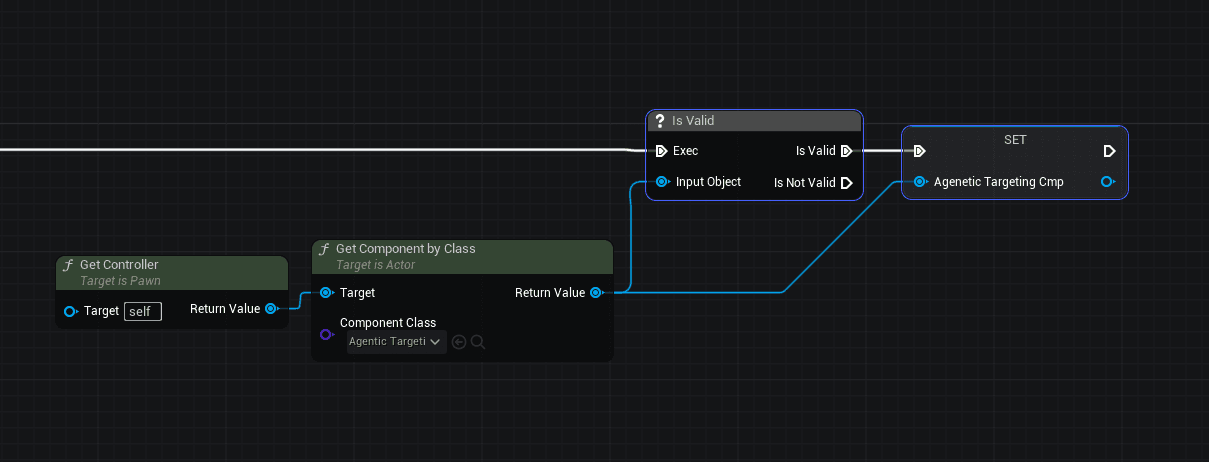
Flow:
- Get Controller → Get Component by Class (AgenticTargetingComponent)
- IsValid check
- SET to a variable (e.g., "Agentic Targeting Cmp")
Now you can use this cached reference throughout your character Blueprint.
Configuration
Style: Agentic.Targeting.Style.Freeflow
Soft Lock (SoftLockUpdatePolicy: Event)
Single Target
SoftLockEventTag: Agentic.Targeting.Event.Attack
ValidationPolicy: None (soft lock handles updates)
RelockAction: TryDifferent
RelockFallback: Release
Preset: Agentic.Targeting.Preset.Freeflow
Discovery: 8m AOE Sphere (close range for crowd combat)
Filters: Targetable (no LOS - snappy instant targeting)
Scoring: StickDirection 60% + Distance 40%
Flow Diagram
Key Difference: Soft Lock
| Aspect | SoulsStyle (Hard) | FreeflowStyle (Soft) |
|---|---|---|
| Update | Player toggles | Game auto-updates on attack |
| Validation | Timer-based (1.0s) | None - each attack re-queries |
| Feel | Committed, precise | Fluid, cinematic |
| LOS | Required | Not required (snappy) |
Target Selection
The stick direction at moment of attack determines who you hit:
| Input | Who Gets Selected |
|---|---|
| Attack only (no stick) | Closest target or keeps current (no directional bias) |
| W + Attack | Target in front |
| A + Attack | Target on left |
| S + Attack | Target behind |
| D + Attack | Target on right |
| A + W + Attack | Target front-left |
| D + W + Attack | Target front-right |
| A + S + Attack | Target back-left |
| D + S + Attack | Target back-right |
This is the Arkham/Spider-Man magic - push toward enemy, attack, you fly to them.
Scoring Example
Player pushes stick toward Enemy A. Enemy B is closer but in wrong direction.
| Target | StickDirection (60%) | Distance (40%) | TOTAL |
|---|---|---|---|
| Enemy A | 0.95 | 0.4 | 1.35 ★ |
| Enemy B | 0.20 | 0.9 | 0.68 |
Winner: Enemy A (player pushing toward it)
Integration Code
// Call this when player presses attack input
void AMyCharacter::OnAttackInput()
{
    // 1. First: Soft lock to acquire target
    TargetingComponent->ClearAllTargets();
    TargetingComponent->TriggerSoftLockUpdate();

    // 2. Then: Execute attack toward target
    AActor* Target = TargetingComponent->GetCurrentTarget();
    ExecuteAttack(Target);  // Target may be null if no enemies nearby
}
Blueprint Setup
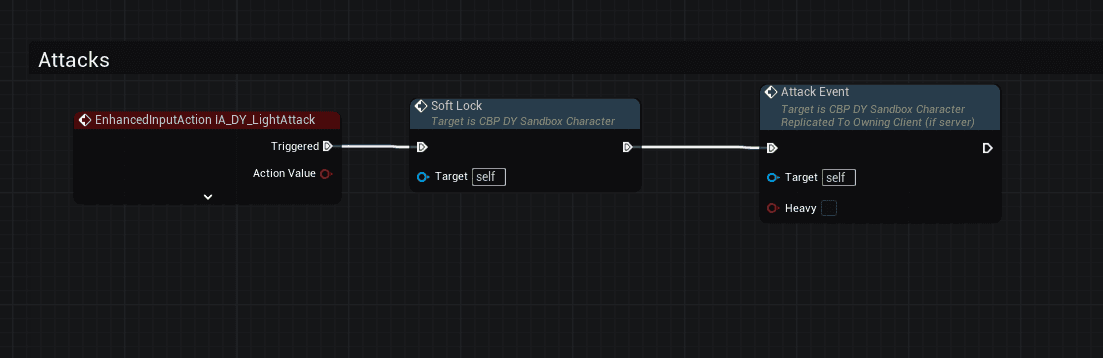
Step 1: Attack Input calls Soft Lock BEFORE Attack
On each attack input, call Soft Lock first to acquire target, then execute the attack:
Step 2: Soft Lock Function
The Soft Lock function clears targets and triggers fresh discovery:
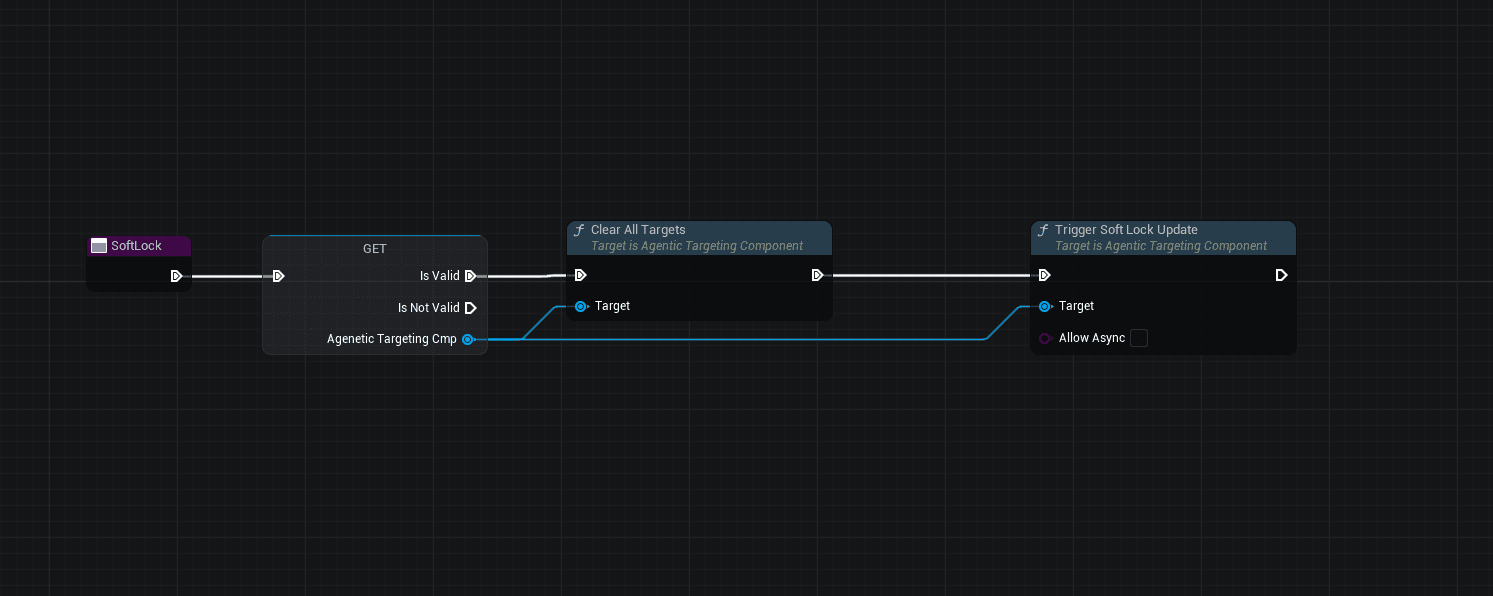
Flow:
EnhancedInputAction(Light Attack) firesSoft Lockfunction called first:- Get Controller → Get AgenticTargetingComponent
- Clear All Targets ← Forces fresh discovery each attack!
- Trigger Soft Lock Update (Allow Async = false)
Attack Eventexecutes (replicated) - now knows who to hit
FreeflowStyle + Freeflow.Ranged
Use Case: Batarangs, thrown gadgets, quick-throw weapons
Configuration
Style: Agentic.Targeting.Style.Freeflow (same as melee freeflow)
Soft Lock (SoftLockUpdatePolicy: Event)
Single Target
ValidationPolicy: None
Preset: Agentic.Targeting.Preset.Freeflow.Ranged
Discovery: 15m AOE Sphere
Filters: Targetable + LOS
Scoring: StickDirection 50% + ScreenCenter 50%
Key Difference from Melee Freeflow
| Property | Freeflow (Melee) | Freeflow.Ranged |
|---|---|---|
| Range | 8m | 15m |
| Break | 12m | 20m |
| LOS | No (snappy) | Yes (need to see) |
| Sort | StickDirection 60% + Distance 40% | StickDirection 50% + ScreenCenter 50% |
Why the differences?
- Melee: Punching crowds - don't care if you see them, hit closest in stick direction
- Ranged: Throwing Batarang - need line of sight, and where you're looking matters more than distance
Target Selection
Same as melee freeflow - stick direction determines target:
| Input | Who Gets Selected |
|---|---|
| Throw only (no stick) | Target nearest screen center |
| W + Throw | Target in front near crosshair |
| A + Throw | Target on left near crosshair |
The ScreenCenter scoring means even with stick direction, targets closer to your crosshair get priority.
Blueprint Setup
Same as melee freeflow - call Soft Lock on gadget throw input.
Weapon Switching
// Player equips Batarang
void AMyCharacter::OnGadgetEquipped()
{
    // Keep Freeflow style, change to ranged preset
    TargetingComponent->SetPresetByTag(
        FGameplayTag::RequestGameplayTag("Agentic.Targeting.Preset.Freeflow.Ranged")
    );
}

// Player switches back to fists
void AMyCharacter::OnMeleeEquipped()
{
    TargetingComponent->SetPresetByTag(
        FGameplayTag::RequestGameplayTag("Agentic.Targeting.Preset.Freeflow")
    );
}
ZeldaStyle + MeleeCombat
Use Case: Zelda Z-Targeting style
Configuration
Style: Agentic.Targeting.Style.Zelda
Hard Lock (SoftLockUpdatePolicy: None)
Single Target
ValidationPolicy: PoolOnly @ 0.2s
ValidationFailAction: TrySwitch
RelockAction: Cycle (tap to cycle through targets)
RelockFallback: Keep (stay on current if only one)
Preset: Agentic.Targeting.Preset.Melee (same as Souls)
Key Difference: Cycle vs TryDifferent
| Action | SoulsStyle | ZeldaStyle |
|---|---|---|
| Press Lock (has target) | TryDifferent → Release if none | Cycle → Keep if only one |
| Only one target | Releases lock | Stays locked |
| Multiple targets | Switches to different | Cycles through all |
Player Actions
| Action | Result |
|---|---|
| Press Lock (no target) | Find + lock best target |
| Press Lock (has target) | Cycle to next target in pool |
| Only one target in range | Keep current (no release) |
| Target dies | TrySwitch to next |
Blueprint Setup
Same as SoulsStyle - use Lock() button toggle. See SoulsStyle Blueprint Setup.
SoulsStyle + RangedCombat
Use Case: Bow/projectile aiming with Souls-style lock
Configuration
Style: Agentic.Targeting.Style.Souls (same as melee)
Preset: Agentic.Targeting.Preset.Ranged
Discovery: 30m Sphere Trace (1m radius)
Filters: Targetable + LOS
Scoring: ScreenCenter 60% + Distance 40%
Flow Diagram
Key Differences from Melee
| Aspect | Melee | Ranged |
|---|---|---|
| Discovery | AOE sphere around player | Trace in aim direction |
| Range | 15m (short) | 30m (long) |
| Primary Sort | Distance (50%) | ScreenCenter (60%) |
| Use Case | Sword/axe | Bow/magic |
Scoring Example
Player aiming at Enemy A (centered in view). Enemy B is off to the side but closer.
| Target | ScreenCenter (60%) | Distance (40%) | TOTAL |
|---|---|---|---|
| Enemy A | 0.95 | 0.3 | 1.25 ★ |
| Enemy B | 0.40 | 0.8 | 1.20 |
Winner: Enemy A (what player is aiming at beats closer target)
Weapon Switching
// Player switches from sword to bow
void AMyCharacter::OnWeaponSwitched(EWeaponType NewWeapon)
{
    // Keep same SoulsStyle, just change preset
    if (NewWeapon == EWeaponType::Bow)
    {
        TargetingComponent->SetPresetByTag("Agentic.Targeting.Preset.Ranged");
    }
    else if (NewWeapon == EWeaponType::Sword)
    {
        TargetingComponent->SetPresetByTag("Agentic.Targeting.Preset.Melee");
    }
    // Style stays Souls - same lock behavior, different query
}
Blueprint Setup
Same as SoulsStyle - use Lock() button toggle. See SoulsStyle Blueprint Setup.
GoW Style + MeleeCombat
Use Case: God of War (2018) style combat with forgiving lock
Configuration
Style: Agentic.Targeting.Style.GoW
Hard Lock (SoftLockUpdatePolicy: None)
Single Target
ValidationPolicy: PoolOnly @ 1.0s
ValidationFailAction: TrySwitch
GracePeriod: 0.7s (longer than Souls)
RelockAction: TryDifferent
RelockFallback: Release
Preset: Agentic.Targeting.Preset.Melee
Discovery: 8m AOE Sphere
Filters: Targetable + LOS
Scoring: Distance 50% + ScreenCenter 30% + Threat 20%
Key Difference from Souls
| Aspect | SoulsStyle | GoW Style |
|---|---|---|
| Grace Period | 0.5s | 0.7s (more forgiving) |
| Range | 8m | 8m (same preset, longer grace) |
| Feel | Tight, punishing | Responsive but forgiving |
The longer grace period means you can dodge behind cover briefly without losing lock - great for action games where enemies move a lot.
Blueprint Setup
Same as SoulsStyle - use Lock() button toggle. See SoulsStyle Blueprint Setup.
TwinStickStyle + Ranged
Use Case: Cursor-following auto-aim for ranged combat (twin-stick shooters, aim assist)
Pre-requisite: Cache the Targeting Component
Same as Freeflow - cache the component on BeginPlay:
Configuration
Style: Agentic.Targeting.Style.TwinStick
Soft Lock (SoftLockUpdatePolicy: PoolOnly)
Single Target
SoftLockUpdateInterval: 0.1s (100ms re-evaluation)
ValidationPolicy: None
Preset: Agentic.Targeting.Preset.Ranged
Discovery: 30m Sphere Trace
Filters: Targetable + LOS
Scoring: ScreenCenter 60% + Distance 40%
Flow Diagram
Key Difference: Timer-Based Auto-Update
| Aspect | FreeflowStyle | TwinStickStyle |
|---|---|---|
| Update Trigger | Event (attack input) | Timer (100ms) |
| Re-query | Once per attack | Continuous while aiming |
| Feel | Reactive, attack-driven | Smooth, cursor-following |
| Use Case | Melee freeflow | Ranged auto-aim |
Target Selection
Target constantly updates to whoever is nearest to crosshair:
| Situation | Who Gets Selected |
|---|---|
| Aim at Enemy A | Enemy A locked |
| Move cursor to Enemy B | Automatically switches to Enemy B |
| No enemy near crosshair | Nearest visible enemy |
| Release aim | Target cleared |
The magic: just aim near an enemy and they're auto-targeted. No button press needed.
Integration Code
// Called when aim input is pressed/released
void AMyCharacter::OnAimInput(bool bIsAiming)
{
    if (bIsAiming)
    {
        // Start auto-targeting while aiming
        TargetingComponent->Lock();
    }
    else
    {
        // Stop targeting when aim released
        TargetingComponent->Unlock(false);  // false = no grace period
    }
}
Blueprint Setup
Toggle Lock Function
The toggle function checks aim state and calls Lock/Unlock:
Flow:
EnhancedInputAction(Aim) fires- Toggle Lock function called:
- Get cached AgenticTargetingComponent
- IsValid check
- Branch on Is Aim Input Down
- True → Lock() (starts 100ms timer)
- False → Unlock() (Use Grace Period = false)
When to Use TwinStick vs Freeflow
| Style | Best For |
|---|---|
| TwinStickStyle | Aiming down sights, cursor-based targeting, twin-stick shooters |
| FreeflowStyle | Attack-driven targeting, crowd combat, melee rushes |
TwinStick feels like aim-assist - smooth target following while you aim. Freeflow feels like Arkham - snap to target on each attack.
Combat Awareness + Any Style
Use Case: Track multiple threats while locked to one
Configuration
Add awareness alongside any lock style:
// On combat enter
TargetingComponent->StartAwareness(FGameplayTag::RequestGameplayTag("Agentic.Targeting.Preset.Awareness.Melee"));

// Get peripheral threats
TArray<FAgenticTargetData> Threats = TargetingComponent->GetAwarenessTargets();

// Show threat indicators on HUD
for (const FAgenticTargetData& Threat : Threats)
{
    ShowThreatIndicator(Threat.Target, Threat.Angle, Threat.ThreatLevel);
}
Preset: Agentic.Targeting.Preset.Awareness.Melee
Discovery: 15m AOE Sphere
Filters: Targetable only (no LOS - see threats through walls)
Scoring: ThreatLevel 60% + Distance 40%
Use With Any Lock Style
// Souls lock + awareness = best of both worlds
TargetingComponent->SetStyleByTag("Agentic.Targeting.Style.Souls");
TargetingComponent->SetPresetByTag("Agentic.Targeting.Preset.Melee");
TargetingComponent->StartAwareness("Agentic.Targeting.Preset.Awareness.Melee");

// Now you have:
// - Hard lock to primary target (GetCurrentTarget)
// - Awareness of peripheral threats (GetAwarenessTargets)
Multi-Lock Missiles (BETA)
Use Case: Homing missiles, mark-and-execute, cleave attacks (Ace Combat, Zone of the Enders, Splinter Cell)
Note: Multi-lock is currently in BETA. The API is functional but may change.
Configuration
Style: Custom style with LockCapacity: "Multi"
{
    "Name": "MultiLockMissiles",
    "StyleTag": { "TagName": "Agentic.Targeting.Style.MultiLock" },
    "DisplayName": "Multi-Lock Missiles",
    "Description": "Lock onto multiple targets (up to 5). Each Lock() adds next best target.",
    "LockCapacity": "Multi",
    "MaxLockedTargets": 5,
    "SoftLockUpdatePolicy": "None",
    "ValidationPolicy": "PoolOnly",
    "ValidationTickInterval": 0.5,
    "ValidationFailAction": "Release",
    "GracePeriod": 0.3,
    "RelockAction": "TryDifferent",
    "RelockFallback": "Release"
}
Preset: Agentic.Targeting.Preset.Melee (or custom preset with wider range)
How Multi-Lock Works
- First
Lock()call: Locks onto best target - Subsequent
Lock()calls: Adds next best unlocked target - At
MaxLockedTargets: NextLock()releases all
Flow Diagram
Multi-Lock API
// Get all locked targets (for multi-lock missiles, etc.)
TArray<AActor*> Targets = TargetingComponent->GetLockedTargets();

// Check if specific target is locked
bool bLocked = TargetingComponent->HasLockedTarget(EnemyActor);

// Manually add/remove from multi-lock
TargetingComponent->AddLockedTarget(BossActor);
TargetingComponent->RemoveLockedTarget(DeadEnemy);

// Check capacity
bool bCanAdd = TargetingComponent->CanAddMoreLockedTargets();
int32 Count = TargetingComponent->GetLockedTargetCount();
Use Case: Multi-Lock Missiles
void AMyCharacter::FireMultiLockMissiles()
{
    TArray<AActor*> LockedTargets = TargetingComponent->GetLockedTargets();

    for (AActor* Target : LockedTargets)
    {
        // Spawn homing missile for each locked target
        SpawnHomingMissile(Target);
    }

    // Clear locks after firing
    TargetingComponent->ReleaseLock();
}
Use Case: Cleave Attack
void AMyCharacter::PerformCleaveAttack()
{
    TArray<AActor*> LockedTargets = TargetingComponent->GetLockedTargets();

    // Damage all locked targets
    for (AActor* Target : LockedTargets)
    {
        ApplyDamage(Target, CleaveBaseDamage);
    }
}
Blueprint Setup
Same as single-lock - use Lock() button. Each press adds a target until max, then releases all. See Souls Style setup for the Blueprint.
Tip: For best results, add a UI indicator showing the current locked target count (e.g., "2/5 LOCKED").