Weather
Build weather types from typed effects, control severity and arrival, and layer weather looks over the day cycle
Weather
A weather type combines a name, a kind tag, an instanced effect list, and an optional look preset. Agentic Atmos resolves those effects into weather state and applies the weather look over the active day-cycle look. This guide covers the authoring workflow in Unreal Engine 5.8.
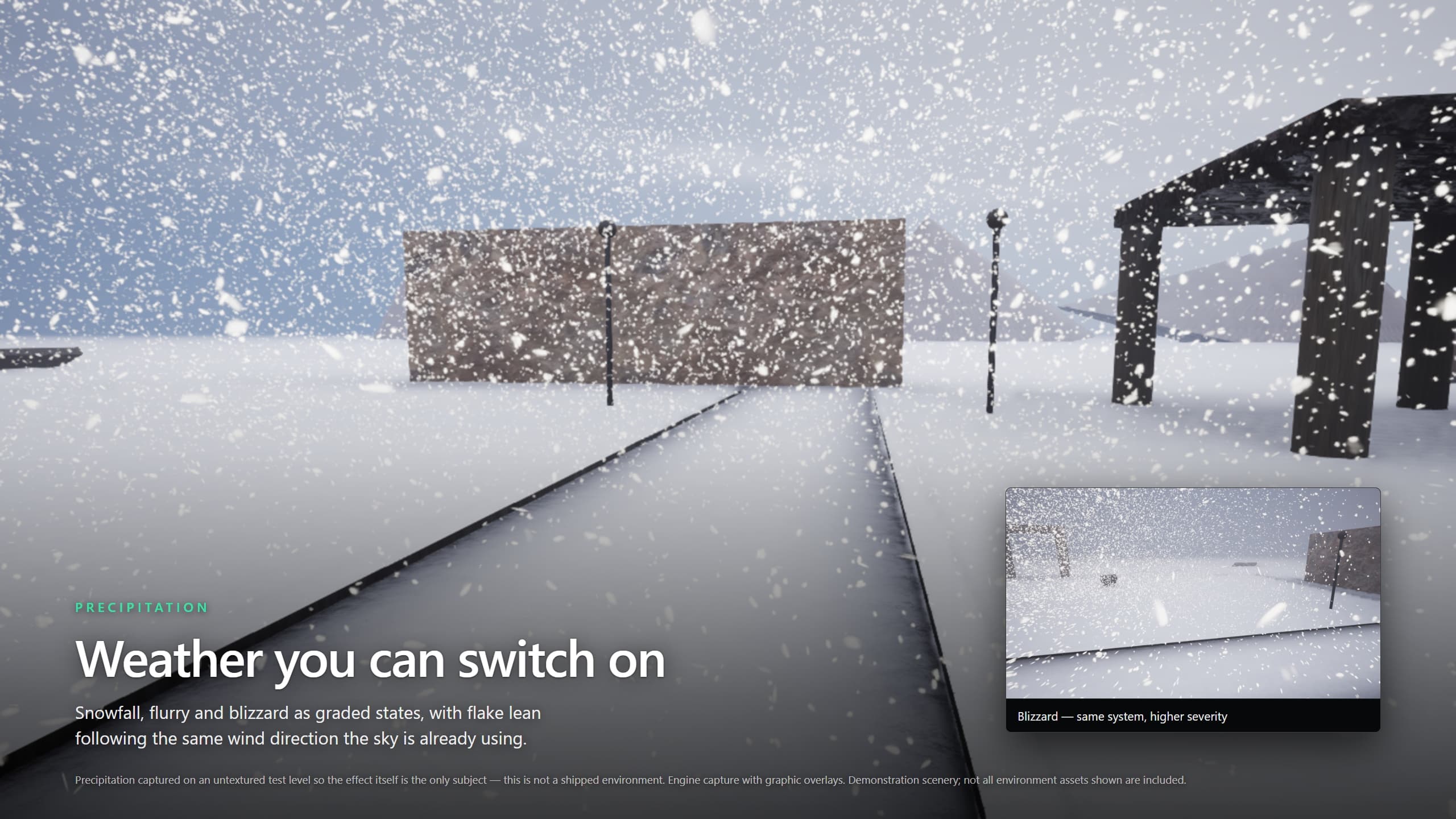
Rendered with Agentic Atmos in the plugin showcase level, with graphic overlays. Demonstration scenery is not all included. This is a rendered example, not an editor screenshot.
Weather types describe atmospheric state. Their names do not guarantee that every associated phenomenon has a supplied visual renderer. Niagara must be enabled for the supplied precipitation systems.
Start with a supplied type
The plugin includes 14 weather-type assets in its Weather > Types content folder:
| Family | Weather types |
|---|---|
| Clear and clouded | Clear, Overcast |
| Rain | Drizzle, SteadyRain, Shower, Rain, Downpour, Monsoon |
| Storms | Thunderstorm, Squall, Hurricane |
| Snow | Flurry, Snowfall, Blizzard |
Enable Show Plugin Content to browse them. Duplicate the closest type into your own project content before editing it. A clear type can have an empty Effects array: it then contributes no weather channels.
Author a weather type
Create or open a UAtmosWeatherType data asset, then configure:
| Field | What you author |
|---|---|
WeatherName | Localizable display name for pickers and weather UI |
Description | Localizable description of the intended mood |
KindTag | Weather identity in the Atmos.Weather namespace |
Icon | Optional image for editor or forecast UI |
Effects | Instanced, typed phenomenon objects; edit each in place |
LookPreset | Optional UAtmosLookPreset layered over the composed day by severity |
Each effect instance belongs to that weather asset and holds its own typed controls. Renderer assets are separate shared references: one renderer definition can serve several weather types without duplicating its binding rows.
BuildCore() adds the effects' contributions, then clamps the combined normalized channels once after summation. Wind direction wraps. It represents severity 1 before weather transitions; it does not read a world or clock. Do not manually multiply every effect by severity as well—the resolved weather applies that scaling once.
The complete native effect list
| Effect class | Main controls | Purpose and limits |
|---|---|---|
UAtmosWeatherEffect_Rain | Intensity, WetnessCoverage, PuddleCoverage | Falling rain and surface-water targets; physical rain-rate derivation drives drops and impact companions |
UAtmosWeatherEffect_StormDebris | GroundSmokeAmount, AirSmokeAmount, LeafAmount, DebrisAmount, TornadoAmount, Responses | Derives wind-driven companion signals. It contributes no core weather channels; visible content requires a renderer. Tornado amount defaults to zero |
UAtmosWeatherEffect_Snow | Intensity, Coverage, SettleTimeScale, MeltTimeScale | Falling snow and settled coverage, with accumulation and melt behavior |
UAtmosWeatherEffect_Dust | Intensity, Coverage | Airborne-density and settled-dust channels; the supplied airborne dust path is not a finished renderer |
UAtmosWeatherEffect_Fog | Level | Density boost over the day look's authored fog baseline |
UAtmosWeatherEffect_Clouds | Coverage | Cloud-coverage contribution |
UAtmosWeatherEffect_Lightning | Rate, StrikeBurst | Strike-frequency input and an optional per-strike Niagara burst; no supplied bolt VFX is assigned |
UAtmosWeatherEffect_Wind | Intensity, bApplyDirection, DirectionDeg, Gustiness | Normalized wind boost, optional steering, and gust depth |
The base UAtmosWeatherEffect contributes and derives nothing by itself; a data-only or channel-only effect is valid. Weather effect instances are distinct from a look preset's ordered UAtmosEffectModifier adjustments.
Rain's wetness and puddle controls are ceilings for accumulated state, not an instant promise of that much water. The effects component preserves accumulated world state across weather changes, and puddles can lag accumulated wetness. Snow similarly settles toward its coverage ceiling and melts over time. Surface changes need materials that consume the published state; they are not a blanket replacement of every material in your level.
Renderer ownership
An effect's Renderers array contains direct shared renderer references. RendererTags can also resolve renderer assets through the active UAtmosRenderProfile. Direct references are considered first; tagged candidates follow. Tag matching is exact—an unknown tag does not fall back to a parent or a different renderer.
The host mounts the first candidate that provides a system. An empty renderer selection means no mounted VFX, although the effect's channels may still drive fog, wind, or world response. MountOffset places the effect relative to the sky actor in centimeters.
Lightning uses a different lifecycle: StrikeBurst is a one-shot system spawned at each strike's geometry, not a persistent entry in Renderers. A null burst renders no bolt, independently of flash and event channels.
Preview a weather type without changing simulation
- Start from a working sky actor and day cycle.
- Hold time and camera so you can judge weather independently of solar motion.
- On the sky actor, set
OverrideWeatherto your type. - Set
OverrideWeatherSeveritybetween 0 and 1, then use Refresh Now if needed. - Compare zero severity, an intermediate severity, and full severity. Inspect atmosphere, precipitation, and surface response separately.
- Save your weather type and any edited look or renderer assets.
- Clear
OverrideWeatherwhen finished so the simulator drives weather again.
The authoring override bypasses simulation, seasonal transformation, and arrival crossfades, and it outranks bDriveWeather. It does not modify simulator state. Use the simulator's ForceWeather path when you need to evaluate a transitioned weather change; a pinned preview does not prove the arrival ramp.
Control arrival and severity
Arrival and variation are type-level settings, so rain, wind, fog, and darkening change together rather than running unrelated effect clocks.
| Field | Default | Behavior |
|---|---|---|
bOverrideTransitionDuration | false | Use this type's arrival duration instead of the simulator default |
TransitionDurationSeconds | 30 | Arrival crossfade in seconds; zero is a hard cut when the override is enabled |
TransitionCurve | Empty | Shapes the raw 0–1 arrival ramp; empty means linear, and the result is clamped to 0–1 |
SeverityVariation | Steady | Chooses constant, physical, or custom-curve severity |
VariationAmplitude | 0.25 | Physical variation depth as a fraction of rolled severity, up to ±25% at the default |
VariationPeriodSeconds | 45 | Approximate seconds per smooth physical swell, not a fixed metronome |
SeverityNoisePhaseOffset | Authored default | Starting position on the physical variation noise |
SeverityCurve | None | Custom severity multiplier over seconds since arrival, looping over its authored time range |
EAtmosSeverityVariation has three modes:
- Steady: holds the rolled severity throughout the weather's lifetime.
- Physical: smoothly varies it using amplitude, period, and phase.
- CustomCurve: multiplies rolled severity by the looped curve, clamping the final result to 0–1. No curve means steady behavior.
The arrival curve maps raw ramp on X to blend weight on Y. Rain's visible rate is nonlinear in blended intensity, so a linear arrival blend can still begin lightly and build into heavier rain. Use controlled captures across the arrival window rather than judging only the endpoint.
Layer a weather look over the day
Assign an ordinary UAtmosLookPreset to the weather type's LookPreset. Only the categories present in that preset are asserted over the composed day, weighted by severity. Continuous settings blend; discrete choices retain their selection behavior rather than becoming partially mounted content.
For example, a weather look that asserts only Sky Light and Clouds can flatten ambient light and thicken the cloud deck while preserving the day look's sun settings. A null weather look changes no look categories; a drizzle can wet the ground without replacing the lighting grade.
Severity zero is an exact identity for the weather-look layer: the look is unchanged from the same instant with no weather look. At full severity, asserted groups take the weather preset's settings. This does not mean previously accumulated wetness or snow disappears instantly.
Keep a partial weather look partial on purpose. If you need to disable ground fog inherited from a lower layer, use a present Ground Fog modifier with GroundFog.bEnabled = false, rather than removing the modifier.
What the weather names do not promise
- Airborne dust remains a placeholder rather than a finished dust renderer.
- Hail and ash have no supplied effect implementations or content.
- Lightning has a spawn path, but the bolt VFX are unassigned. A Thunderstorm asset alone does not produce rendered bolts.
- Storm-debris controls, including tornado amount, are signal and authoring support—not evidence of a supplied renderer for each phenomenon.
- Calendar and season infrastructure does not include an authored four-season world or automatic foliage transformation.
For a missing visual effect, inspect the selected type, its effect instance, and the renderer actually mounted before increasing intensity.
Next steps
Connect your content to wind, add ground-fog banks, or use agent toolsets for repeatable inspection. Support is available on Discord.