Styles Reference
Complete reference for all targeting styles and their configuration options
Targeting Styles Reference
Complete reference for all targeting styles and their configuration options.
The 6 styles below are starter templates included with the plugin. Creating custom styles is simple - just create a Data Asset and configure properties. No C++ required. See Creating Custom Styles.
Quick Comparison
| Style | Lock Type | Toggle Behavior | Grace Period | Best For |
|---|---|---|---|---|
| Souls | Hard | Try different, release if none | 0.5s | Dark Souls, Elden Ring |
| GoW | Hard | Try different, release if none | 0.7s | God of War (2018) |
| Zelda | Hard | Cycle to next, keep if only one | 0.5s | Legend of Zelda |
| Freeflow | Soft | Stick direction priority | None | Crowd combat |
| TwinStick | Soft | Timer-based auto-acquire | None | HELLDIVERS, twin-stick shooters |
| MultiLock | Multi | Add target per press (BETA) | 0.3s | Missiles, mark-and-execute |
Hard Lock vs Soft Lock
Hard Lock (Souls, GoW, Zelda)
Player explicitly controls lock state:
- Press input to lock
- Press again to release or switch
- Camera centers on target
- UI shows clear lock indicator
- Target persists until released or invalid
Soft Lock (Freeflow)
System manages target automatically:
- Game code calls
TriggerSoftLockUpdate()on attack - Target changes per-attack based on input direction
- No persistent lock indicator
- More fluid, cinematic combat
Validation & Relock
These four properties decide what happens to an existing lock over time and on re-press. They are easy to confuse, so here is exactly what each one does.
ValidationPolicy — how the locked target is re-checked on a timer
| Value | Behavior |
|---|---|
| None | No timer validation. Lock only breaks on death/destroyed (or a manual InvalidateTarget). |
| PoolOnly | Re-checks only the locked target against the preset filters (LOS, distance, alive) each tick. Other pooled targets are left alone. Default for hard lock. |
| UseSame | Re-runs the full preset (selection + filter + sort) each tick, so targets that re-enter view rejoin the switchable pool ("re-discovery"). |
| UseOverridePreset | Like UseSame but against the preset's ValidationPresetOverride (e.g. a larger break distance than acquire distance). |
| Event | No timer; game code calls validation manually. |
ValidationTickInterval controls how often the timer fires (e.g. 0.2).
If switching ValidationPolicy between None / PoolOnly / UseSame seems to make no
difference, the most common cause is that nothing is actually invalidating the target.
Add an LOS or distance filter to the preset and break line of sight — then PoolOnly
breaks the lock, while UseSame additionally re-populates the pool when targets return.
ValidationFailAction — what happens when the locked target fails validation
| Value | Behavior |
|---|---|
| Release | Drop the lock. |
| TrySwitch | Switch to the next target that currently passes the filters (validate-before-switch — never switches to an occluded target), and release only if none qualify. |
GracePeriod — hold the lock through brief invalidity
Seconds the lock is held after the target first fails validation (e.g. ducking
behind a wall, edge of max distance). 0 = instant break. If the target becomes valid
again within the window, the lock is kept; otherwise ValidationFailAction runs at
expiry. Applies to LOS/distance failures — death is always instant (no grace).
RelockAction & RelockFallback — pressing Lock while already locked
RelockAction / RelockFallback only fire when the player re-presses Lock while
already locked. They have nothing to do with validation failure (that is
ValidationFailAction). And note Keep is a RelockFallback value, not a
ValidationFailAction value.
RelockAction | On re-press |
|---|---|
| TryDifferent | Find the best different target (Souls). |
| Cycle | Cycle to the next target in order (Zelda). |
| Release | Always drop the lock. |
RelockFallback | When the relock action finds no alternative |
|---|---|
| Release | Drop the lock. |
| Keep | Stay on the current target. |
Souls Style
Tag: Agentic.Targeting.Style.Souls
Classic Dark Souls targeting. Toggle hard lock that stays on target until manually released or a different target is found.
Properties
| Property | Value | Description |
|---|---|---|
| LockCapacity | Single | One target at a time |
| SoftLockUpdatePolicy | None | No soft lock updates |
| ValidationPolicy | PoolOnly | Validate against target pool |
| ValidationTickInterval | 1.0s | Check validity every second |
| ValidationFailAction | TrySwitch | Auto-switch when target invalid |
| GracePeriod | 0.5s | Time before validation fails |
| RelockAction | TryDifferent | Toggle finds different target |
| RelockFallback | Release | Release if no other target |
| DefaultLockPresetTag | Melee | Uses melee preset by default |
| bAutoStartAwareness | true | Auto-track peripheral threats |
Behavior Flow
When Target Becomes Invalid
- Target dies, goes out of range, or loses LOS
- Grace period (0.5s) starts
- If still invalid after grace: ValidationFailAction = TrySwitch
- Find next best target and switch, or release if none
Code Example
// Set Souls style
TargetingComponent->SetStyleByTag(
    FGameplayTag::RequestGameplayTag("Agentic.Targeting.Style.Souls")
);

// Lock on (toggle)
TargetingComponent->Lock();
God of War Style
Tag: Agentic.Targeting.Style.GoW
Same as Souls but more forgiving. Longer grace period prevents frustrating lock breaks during high-mobility combat.
Properties
| Property | Value | Difference from Souls |
|---|---|---|
| GracePeriod | 0.7s | +0.2s more forgiving |
| All others | Same | Identical to Souls |
When to Use
- Fast-paced action with high mobility
- Combat where targets frequently go behind cover
- Games with aggressive enemy movement
- Any situation where 0.5s grace feels too punishing
Code Example
TargetingComponent->SetStyleByTag(
    FGameplayTag::RequestGameplayTag("Agentic.Targeting.Style.GoW")
);
Zelda Style
Tag: Agentic.Targeting.Style.Zelda
Classic Z-targeting. Toggle cycles through targets instead of releasing, making it easy to manage multiple enemies.
Properties
| Property | Value | Description |
|---|---|---|
| RelockAction | Cycle | Toggle cycles to next target |
| RelockFallback | Keep | Stay on current if only one |
| All others | Same as Souls |
Key Difference: Cycle vs TryDifferent
| Scenario | Souls/GoW | Zelda |
|---|---|---|
| Toggle with 1 target | Releases lock | Stays locked |
| Toggle with 3 targets | Finds "different" (may skip) | Cycles A->B->C->A |
| No targets in range | Releases | Releases |
Behavior Flow
Code Example
TargetingComponent->SetStyleByTag(
    FGameplayTag::RequestGameplayTag("Agentic.Targeting.Style.Zelda")
);

// First press: lock to target
TargetingComponent->Lock();

// Second press: cycle to next (not release!)
TargetingComponent->Lock();
Freeflow Style
Tag: Agentic.Targeting.Style.Freeflow
Arkham/Spider-Man style freeflow combat. Event-based soft lock that automatically targets based on attack direction.
Properties
| Property | Value | Description |
|---|---|---|
| LockCapacity | Single | One target at a time |
| SoftLockUpdatePolicy | Event | Update on gameplay events |
| SoftLockEventTag | Attack | Listens for attack events |
| ValidationPolicy | None | No timer-based validation |
| GracePeriod | 0 | Instant (soft lock handles it) |
| DefaultLockPresetTag | Freeflow | Uses freeflow preset |
Integration Required
Freeflow style requires your game code to trigger updates:
// In your attack system
void AMyCharacter::OnAttackStarted()
{
    // This triggers the soft lock to re-query and pick best target
    TargetingComponent->TriggerSoftLockUpdate();

    // Get the selected target for your attack
    AActor* Target = TargetingComponent->GetCurrentTarget();
    if (Target)
    {
        // Lunge toward target, play hit reaction, etc.
        PerformAttackOn(Target);
    }
}
Why No Validation?
Soft lock styles don't need validation timers because:
- Target is re-queried every attack
- Dead/invalid targets naturally filtered out
- Each attack picks the best current target
Code Example
TargetingComponent->SetStyleByTag(
    FGameplayTag::RequestGameplayTag("Agentic.Targeting.Style.Freeflow")
);

// Don't call Lock() directly - trigger from attacks
void OnPlayerAttack()
{
    TargetingComponent->TriggerSoftLockUpdate();
}
When to Use Freeflow vs TwinStick
| Style | Best For |
|---|---|
| Freeflow | Attack-driven targeting, crowd combat (Arkham, Spider-Man) |
| TwinStick | Continuous auto-aim while aiming (twin-stick shooters) |
TwinStick Style
Tag: Agentic.Targeting.Style.TwinStick
HELLDIVERS-style continuous auto-targeting. Timer-based soft lock that constantly evaluates and acquires the best target without player input.
Properties
| Property | Value | Description |
|---|---|---|
| LockCapacity | Single | One target at a time |
| SoftLockUpdatePolicy | PoolOnly | Update on timer tick |
| SoftLockUpdateInterval | 0.1s | Re-evaluate every 100ms |
| ValidationPolicy | None | No timer-based validation |
| GracePeriod | 0 | Instant (continuous update handles it) |
| DefaultLockPresetTag | Melee | Uses melee preset by default |
How It Works
Unlike Freeflow (event-based per attack), TwinStick continuously evaluates:
- Every 100ms, query for best target
- Automatically acquire/switch to best target
- Fires
OnBecameTarget/OnLostTargetfor UI updates - No player input required - just aims at best target
When to Use
- Twin-stick shooters - Geometry Wars, Enter the Gungeon
- Top-down shooters - HELLDIVERS, Alien Swarm
- Auto-aim systems - When player aims with stick, system picks target
- Companion AI - NPCs that auto-target threats
Behavior Flow
Code Example
// Set TwinStick style
TargetingComponent->SetStyleByTag(
    FGameplayTag::RequestGameplayTag("Agentic.Targeting.Style.TwinStick")
);

// No Lock() calls needed - targeting runs automatically
// Just read the current target when needed:
AActor* Target = TargetingComponent->GetCurrentTarget();
if (Target)
{
    // Aim weapon, show indicator, etc.
}
TwinStick vs Freeflow
| Aspect | TwinStick | Freeflow |
|---|---|---|
| Trigger | Timer (continuous) | Event (per attack) |
| Question | "Who am I aiming at now?" | "Who do I hit with this attack?" |
| Player input | None needed | Attack triggers update |
| Use case | Shooters, auto-aim | Melee brawlers |
MultiLock Style (BETA)
Tag: Agentic.Targeting.Style.MultiLock
Lock onto multiple targets simultaneously. Each Lock() call adds the next best target until max capacity, then releases all. Perfect for missile systems, mark-and-execute, or cleave attacks.
BETA Feature: Multi-lock is functional but the API may change in future versions.
Properties
| Property | Value | Description |
|---|---|---|
| LockCapacity | Multi | Multiple targets simultaneously |
| MaxLockedTargets | 5 | Maximum targets (configurable 0-20) |
| SoftLockUpdatePolicy | None | No soft lock (hard lock behavior) |
| ValidationPolicy | PoolOnly | Validate all locked targets |
| ValidationTickInterval | 0.5s | Check validity every 500ms |
| ValidationFailAction | Release | Release all if any fails |
| GracePeriod | 0.3s | Brief grace before validation fails |
| RelockAction | TryDifferent | Add different target each press |
How It Works
- First Lock(): Locks onto best target
- Subsequent Lock(): Adds next best unlocked target
- At MaxLockedTargets: Next
Lock()releases all
Behavior Flow
Multi-Lock API
// Get all locked targets
TArray<AActor*> Targets = TargetingComponent->GetLockedTargets();

// Check if specific target is locked
bool bLocked = TargetingComponent->HasLockedTarget(EnemyActor);

// Manually add/remove targets
TargetingComponent->AddLockedTarget(BossActor);
TargetingComponent->RemoveLockedTarget(DeadEnemy);

// Check capacity
bool bCanAdd = TargetingComponent->CanAddMoreLockedTargets();
int32 Count = TargetingComponent->GetLockedTargetCount();
Use Case: Multi-Lock Missiles
void AMyCharacter::FireMultiLockMissiles()
{
    TArray<AActor*> LockedTargets = TargetingComponent->GetLockedTargets();

    for (AActor* Target : LockedTargets)
    {
        SpawnHomingMissile(Target);
    }

    // Clear locks after firing
    TargetingComponent->ReleaseLock();
}
Use Case: Mark-and-Execute
void AMyCharacter::ExecuteMarkedTargets()
{
    TArray<AActor*> LockedTargets = TargetingComponent->GetLockedTargets();

    // Instant kill all marked targets (Splinter Cell style)
    for (AActor* Target : LockedTargets)
    {
        ApplyInstantKill(Target);
    }

    TargetingComponent->ReleaseLock();
}
Blueprint Setup
Same as single-lock styles - use Lock() button. Each press adds a target:
- Press 1: Lock target A
- Press 2: Lock target B (A stays locked)
- Press 3: Lock target C (A, B stay locked)
- Press 4: Lock target D
- Press 5: Lock target E (at max)
- Press 6: Release all (A-E unlocked)
Style Properties Reference
LockCapacity
| Value | Description |
|---|---|
| Single | One target at a time (default) |
| Multi | Multiple targets simultaneously (BETA) |
SoftLockUpdatePolicy
| Value | Description |
|---|---|
| None | No soft lock (hard lock only) |
| Event | Update on TriggerSoftLockUpdate() |
| Timer | Update on interval (use with SoftLockUpdateInterval) |
ValidationPolicy
| Value | Description |
|---|---|
| None | No validation (soft lock styles) |
| PoolOnly | Validate target is still in query pool |
| Full | Run full validation preset |
ValidationFailAction
| Value | Description |
|---|---|
| Release | Immediately release lock |
| TrySwitch | Try to switch to another valid target |
| Keep | Keep invalid target (for grace period) |
RelockAction
| Value | Description |
|---|---|
| Release | Pressing lock while locked releases |
| TryDifferent | Find a different target |
| Cycle | Cycle to next target in pool |
RelockFallback
| Value | Description |
|---|---|
| Release | Release if RelockAction fails |
| Keep | Keep current target |
Switching Styles at Runtime
Change styles dynamically based on game state:
void AMyCharacter::OnCombatModeChanged(ECombatMode NewMode)
{
    switch (NewMode)
    {
    case ECombatMode::Melee:
        // Traditional lock-on for 1v1
        TargetingComponent->SetStyleByTag(
            FGameplayTag::RequestGameplayTag("Agentic.Targeting.Style.Souls"));
        TargetingComponent->SetPresetByTag(
            FGameplayTag::RequestGameplayTag("Agentic.Targeting.Preset.Melee"));
        break;

    case ECombatMode::Crowd:
        // Freeflow for group fights
        TargetingComponent->SetStyleByTag(
            FGameplayTag::RequestGameplayTag("Agentic.Targeting.Style.Freeflow"));
        TargetingComponent->SetPresetByTag(
            FGameplayTag::RequestGameplayTag("Agentic.Targeting.Preset.Freeflow"));
        break;

    case ECombatMode::Ranged:
        // Souls with ranged preset
        TargetingComponent->SetStyleByTag(
            FGameplayTag::RequestGameplayTag("Agentic.Targeting.Style.Souls"));
        TargetingComponent->SetPresetByTag(
            FGameplayTag::RequestGameplayTag("Agentic.Targeting.Preset.Ranged"));
        break;
    }
}
Creating Custom Styles
- Content Browser -> Right-click -> Miscellaneous -> Data Asset
- Pick Agentic Targeting Style
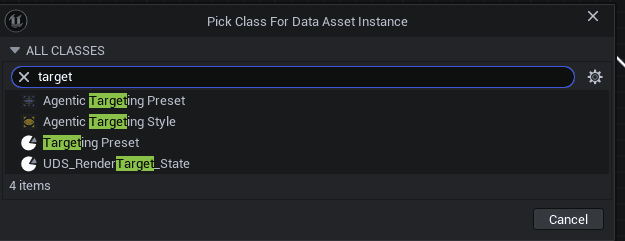
- Fill in the properties:
- Style Tag - Unique tag for this style
- Lock Capacity - Single or Multi
- Validation Policy - How to validate locked target
- Grace Period - Delay before lock breaks
- Relock Action - What happens on toggle while locked
That's it. Your style is ready to use.
TargetingComponent->SetStyleByTag(
    FGameplayTag::RequestGameplayTag("Agentic.Targeting.Style.MyCustom")
);
For AI/External Tools: See AI JSON Workflow for bulk editing and AI-driven config generation.
Style + Preset Combinations
See Targeting Recipes for recommended Style + Preset combinations for common game scenarios.