Multiplayer
GAS GameplayCue replication, entry points, and the hybrid multicast architecture
Multiplayer
Agentic Foley uses a hybrid replication strategy: GAS GameplayCue when the pawn has an AbilitySystemComponent, with automatic fallback to component NetMulticast RPC for no-ASC pawns.
Required Setup — GameplayCueNotifyPaths
Without this step, 2+ player multiplayer silently drops every replicated foley event on remote clients. Standalone and single-player PIE still work because they don't exercise the replication fan-out path, which is exactly why this bug is easy to miss during solo development and then surface on the first listen-server or dedicated-server playtest.
The foley cue handler (GCN_AgenticFoley, registered for the tag GameplayCue.Agentic.Foley) lives inside the plugin at /AgenticGASP/Audio/Foley/. For the GameplayCueManager to pick it up at startup, your project must add that folder to its Gameplay Cue Notify Paths list.
Option A — Project Settings UI (recommended)
- Open Project Settings and search
gameplaycuein the top search bar - Under Game → Gameplay Abilities Settings → Gameplay Cue, find the Gameplay Cue Notify Paths field
- Click the + icon to add a new array element
- Set Index [0] to
/AgenticGASP/Audio/Foley - Save project settings and fully restart the editor —
GameplayCueManageronly scans these paths once at startup
Option B — Direct Config/DefaultGame.ini edit
Append this block to your project's Config/DefaultGame.ini:
[/Script/GameplayAbilities.AbilitySystemGlobals]
+GameplayCueNotifyPaths=/AgenticGASP/Audio/Foley
Save and restart the editor. Same effect as Option A.
Why project config, not plugin config
The plugin also ships a Config/DefaultGame.ini with this entry, but Unreal's UAbilitySystemGlobals::InitGlobalData() runs very early in engine init — before plugin-side game configs have been merged into the effective config cascade. Plugin-side entries are usually missed at cue manager init time, and the cue handler never gets registered. Putting the entry in the project config is the reliable fix. This is a UE engine-level timing quirk; the buyer-side config step is unavoidable.
Verify it worked
After restart, open Output Log, filter by LogGameplayCueNotify. You should see a line like Added path /AgenticGASP/Audio/Foley during startup. Then in 2-player PIE: jump on one client, the other client hears the land sound. If the remote client is silent, double-check the array element is spelled exactly /AgenticGASP/Audio/Foley (no trailing slash, no typo).
Three Event Categories
| Event Type | Replication | Why |
|---|---|---|
| Footsteps (AnimNotify) | None needed | AnimNotifies replicate via the anim graph. Every peer fires the notify locally. Free. |
| Jump / Land / Slide (BP) | TriggerFoleyReplicated | BP movement events only fire on authority + autonomous proxy. Needs server RPC. |
| Weapon impacts | TriggerFoleyFromSocket | Fired from authority-side GAS ability. ExecuteGameplayCue directly. |
Entry A — TriggerFoleyReplicated
For BP-driven events fired from the character blueprint (jump, land, slide, dodge, mantle).
Owning client (jumps)
  ├── Runs full pipeline locally → instant feedback
  └── ServerRunFoleyReplicated RPC → Server
        ├── Runs locally (listen host sees it)
        └── FanOutFoleyReplicated:
              ASC available? → ExecuteGameplayCue (GAS multicast)
No ASC? → MulticastRunFoleyReplicated (component RPC)- Owning client gets instant feedback — local pipeline runs BEFORE the server RPC
- Each peer runs the pipeline exactly once — short-circuit on
HasAuthorityorIsLocallyControlled - Component is
SetIsReplicatedByDefault(true)— NetMulticast works without manual BP setup
Entry B — TriggerFoleyFromSocket
For authority-authored weapon impacts. Fires from an AnimNotify on authority or from a GAS ability running on the server.
Authority (GAS ability / server notify)
  └── ExecuteGameplayCue(FoleyGameplayCueTag, Params)
       └── GAS multicasts to every peer
            ├── Authority → skip (already ran)
            ├── Owning client → skip
            └── Simulated proxy → DispatchFoleyResolved
Requires UAbilitySystemComponent on the pawn. No ASC = silent drop. Use TriggerFoleyReplicated for the no-ASC path.
GAS Cue Payload
FGameplayCueParameters carries everything foley needs without a custom replicated struct:
| Parameter | Usage |
|---|---|
PhysicalMaterial | Surface type |
AbilityLevel | Surface fallback (packed int) |
Location | Ground impact point |
Normal | Surface normal for VFX |
AggregatedSourceTags | Foley event tag |
NormalizedMagnitude | Volume multiplier |
RawMagnitude | Pitch multiplier |
The cue handler reconstructs a FAgenticFoleyTraceResult from the replicated parameters and re-enters DispatchFoleyResolved(bReplicateViaCue=false) — same pipeline as local callers, no duplicate spawn logic.
Adding an AbilitySystemComponent
For the GAS cue path, add an AbilitySystemComponent to your character BP — Components > + Add > Ability System Component:
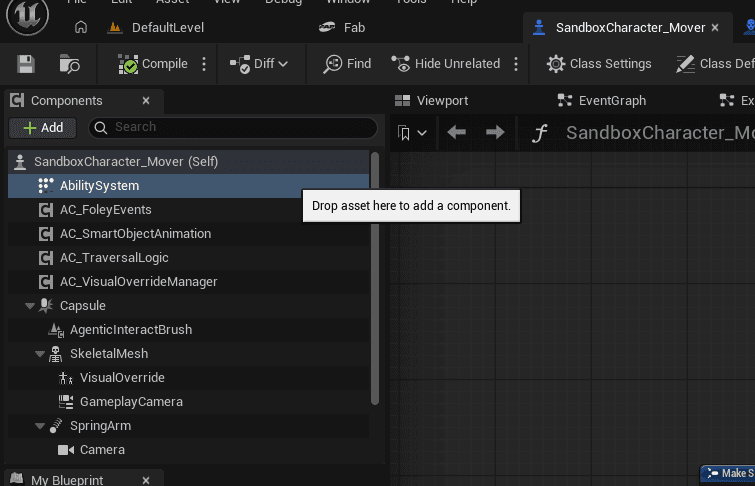
The foley component auto-discovers the ASC in BeginPlay via IAbilitySystemInterface (falling back to FindComponentByClass). No manual wiring required.
No-ASC Projects
When CachedASC is null:
TriggerFoleyReplicatedroutes through NetMulticast automaticallyTriggerFoleyFromSocketsilently skips (requires ASC)- Footsteps work unchanged (AnimNotify-driven, no replication needed)
The Fab ship target (clean GASP sample, no GAS setup) runs the full pipeline locally on each peer via this fallback.